 Share Mealssharemeals.org
Extra food, shared
in seconds.
The Share Meals app lets college students, faculty, and staff share extra food with each other — an unused meal swipe, or food from an event or a meeting. One post, and everyone on campus knows.
Featured in
- The New York Times
- TEDxMU
- EdSurge
- Clinton Hunger Leadership Award
How it works
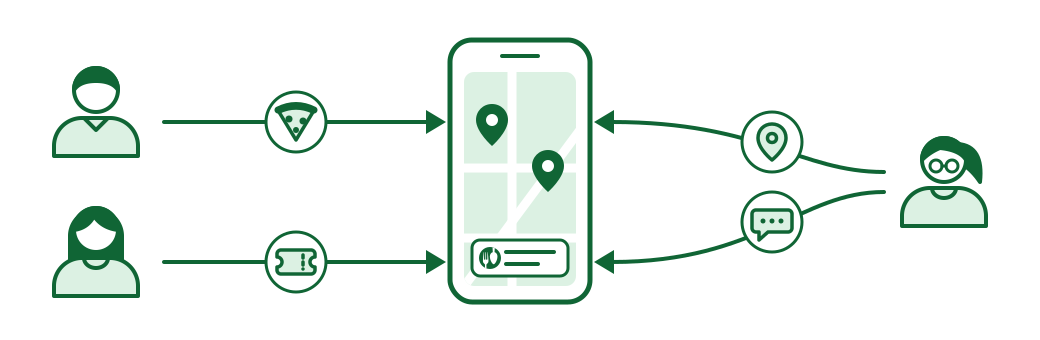
Langston's tutoring club has extra pizza, so he posts a photo with the time and the location.
Emily has extra meal swipes, so she posts the times and dining halls where she is usually free.
Both posts land on one live map, and everyone on campus gets a push notification.
Lucille walks to the student union after class, in time for a few slices of Langston's pizza. Another day she messages Emily and meets her at the dining hall.
Share Meals' fight on college hunger
 Play video: Share Meals' fight on college hunger, 5 minutes 44 seconds
Why it works on a campus
Only verified accounts, and only your campus
Students, faculty, and staff verify a university email address before they can use the app, and they only ever interact with people at their own university.
All communication happens inside the app, with email addresses hidden. Name, major, and profile photo are optional.
Turn on only the parts you want
Want students to share meal swipes but not post food? Or only post food? Features turn on and off per campus, so the app fits the way your dining and student life actually work.
Everyone knows within seconds
The moment someone shares a meal swipe or posts extra food, everyone else on the app gets a push notification — and can open a live map of everything currently on offer.
Works without a smartphone
The app runs on any phone, and in any web browser — a laptop, a desktop, or a machine in the campus computer lab. A student without a smartphone is not shut out.
Sharing a meal, not just food
Students who experience food insecurity are often isolated alongside it. Bringing students together over a good meal is the point of the app, not a side effect of it.
Get the app
Free, and it works on any phone — or in a browser, with no phone at all.
Need help with the app? Get app support.
Scan with your phone camera.


Bring it to your campus.
Tell us how dining works at your university and we will tell you what running the app there would take.